
首页静态化
静态化概念:
用户访问 / 时,真实发生了这件事:
浏览器
   |
   v
IndexView.get()
   |
   |-- 如果 static/index.html 存在
   |       |
   |       +--> 直接读文件 → HttpResponse 返回
   |
   |-- 如果 static/index.html 不存在
           |
           +--> 查数据库
           +--> render("index.html")
           +--> 顺便生成 static/index.html
           +--> 返回页面
运维 / 后台刷新首页时:
访问 /generate_index/
   |
   v
RegenerateIndexView.get()
   |
   +--> generate_static_index_html()
           |
           +--> 查数据库
           +--> 用 Jinja2 渲染 index.html
           +--> 写入 static/index.html
操作
改 apps/contents/urls.py
# apps/contents/urls.py
from django.urls import path
from .views import IndexView, RegenerateIndexView

app_name = "contents"

urlpatterns = [
    path("", IndexView.as_view(), name="index"),
    path("generate_index/", RegenerateIndexView.as_view(), name="generate_index"),
]
改 apps/contents/utils.py
把首页所有数据库查询逻辑
从 View 里抽成一个“纯函数”(build_index_context)并写“静态生成函数”(generate_static_index_html)
# apps/contents/utils.py

import os
from collections import OrderedDict

from django.conf import settings
from django.contrib.auth.models import AnonymousUser
from django.template import engines
from django.test import RequestFactory

from apps.contents.models import ContentCategory
from apps.goods.models import GoodsChannel


def get_categories():
    """封装首页商品频道和分类数据"""
    categories = OrderedDict()

    channels = GoodsChannel.objects.select_related(
        "group", "category"
    ).order_by("group_id", "sequence")

    for channel in channels:
        group_id = channel.group_id

        if group_id not in categories:
            categories[group_id] = {"channels": [], "sub_cats": []}

        cat1 = channel.category
        categories[group_id]["channels"].append({
            "id": cat1.id,
            "name": cat1.name,
            "url": channel.url
        })

        for cat2 in cat1.subs.all():
            cat2.sub_cats = []
            for cat3 in cat2.subs.all():
                cat2.sub_cats.append(cat3)
            categories[group_id]["sub_cats"].append(cat2)

    return categories


def build_index_context():
    """构建首页渲染所需 context"""
    categories = get_categories()

    contents = {}
    for cat in ContentCategory.objects.all():
        contents[cat.key] = cat.content_set.filter(status=True).order_by("sequence")

    return {
        "categories": categories,
        "contents": contents,
        "FDFS_BASE_URL": settings.FDFS_BASE_URL,
    }


def generate_static_index_html():
    """生成 static/index.html"""
    context = build_index_context()

    # 强制使用 Jinja2 引擎渲染
    jinja_engine = engines["jinja2"]
    template = jinja_engine.get_template("index.html")

    # 造一个带 user 的 request(未登录视角)
    request = RequestFactory().get("/")
    request.user = AnonymousUser()

    html_text = template.render(context, request=request)

    file_path = os.path.join(settings.BASE_DIR, "static", "index.html")
    with open(file_path, "w", encoding="utf-8") as f:
        f.write(html_text)

    return file_path
1、为什么要把首页所有数据库查询逻辑从 View 里抽成一个“纯函数”?
因为你现在有 3 个地方都要用首页数据:
- IndexView(动态渲染)
- generate_static_index_html(静态生成)
- 将来信号 / Celery / 运维接口
如果你不抽成函数,就会:
- 拷 3 份 SQL 逻辑
- 后期改一次数据结构,3 处炸
2、写“静态生成函数”,它干了 4 件事:
- 查数据库,拿首页数据
- 用 Jinja2 模板引擎 渲染
index.html - 造一个 fake request(补
request.user) - 把 HTML 写入
static/index.html
一些问题:(1)为什么不用 render()?因为 render() 只能返回 HttpResponse,你现在是要:在后台生成 HTML 文件,不是返回给浏览器。所以你必须手动 template.render(context, request=request)
(2)为什么要造一个 request?因为你模板里有:{{ request.user.username }},如果你不用 fake request:’django.core.handlers.wsgi.WSGIRequest object’ has no attribute ‘user’,所以需要补充:
request = RequestFactory().get("/")
request.user = AnonymousUser()
修改apps/contents/views.py
现在首页访问行为是:
- 优先命中静态文件
- 如果没有 → 动态渲染
- 顺手补生成静态
加运维接口 /generate_index/和刚才apps/contents/urls.py 加的路由path(“generate_index/”, RegenerateIndexView.as_view(), name=”generate_index”),匹配
RegenerateIndexView的意义是什么?
这是生产系统必须要有的东西:
- CDN 缓存炸了
- 首页样式改了
- 运营要强刷首页
- 发布后发现首页没更新
你不需要进服务器、重启 Django、改文件,你只要访问:/generate_index/,就能强制刷新首页静态。
# apps/contents/views.py

import os
from django.conf import settings
from django.http import HttpResponse, JsonResponse
from django.shortcuts import render
from django.views import View

from apps.contents.utils import build_index_context, generate_static_index_html


class IndexView(View):
    def get(self, request):
        static_file = os.path.join(settings.BASE_DIR, "static", "index.html")

        # 1) 静态文件存在 → 直接返回
        if os.path.exists(static_file):
            with open(static_file, "r", encoding="utf-8") as f:
                return HttpResponse(f.read(), content_type="text/html; charset=utf-8")

        # 2) 静态不存在 → 动态渲染
        context = build_index_context()
        response = render(request, "index.html", context)

        # 3) 顺便生成一份静态
        try:
            generate_static_index_html()
        except Exception as e:
            print("⚠️ 生成静态首页失败:", e)

        return response


class RegenerateIndexView(View):
    def get(self, request):
        file_path = generate_static_index_html()
        return JsonResponse({"code": 0, "msg": "首页已重新生成", "file": file_path})
主路由 meiduo_mall/urls.py (简单优化一下)
"""
URL configuration for meiduo_mall project.

The `urlpatterns` list routes URLs to views. For more information please see:
    https://docs.djangoproject.com/en/5.2/topics/http/urls/
Examples:
Function views
    1. Add an import:  from my_app import views
    2. Add a URL to urlpatterns:  path('', views.home, name='home')
Class-based views
    1. Add an import:  from other_app.views import Home
    2. Add a URL to urlpatterns:  path('', Home.as_view(), name='home')
Including another URLconf
    1. Import the include() function: from django.urls import include, path
    2. Add a URL to urlpatterns:  path('blog/', include('blog.urls'))
"""

from django.contrib import admin
from django.urls import path, include
from django.shortcuts import render


import logging
logger = logging.getLogger("meiduo")
def index(request):

    return render(request, "index.html", {"name": "TestName"})


urlpatterns = [
    path("admin/", admin.site.urls),

    # 用户模块
    path("users/", include(("apps.users.urls", "users"), namespace="users")),

    # 首页 + 广告内容模块
    path("", include(("apps.contents.urls", "contents"), namespace="contents")),

    # OAuth
    path("oauth/", include(("apps.oauth.urls", "oauth"), namespace="oauth")),

    # 省市区模块
    path("", include(("apps.areas.urls", "areas"), namespace="areas")),

    # 商品模块
    path("", include(("apps.goods.urls", "goods"), namespace="goods")),

    # 购物车模块
    path("carts/", include(("apps.carts.urls", "carts"), namespace="carts")),

    # 订单模块
    path("orders/", include(("apps.orders.urls", "orders"), namespace="orders")),
]打开:http://127.0.0.1:8000/generate_index/
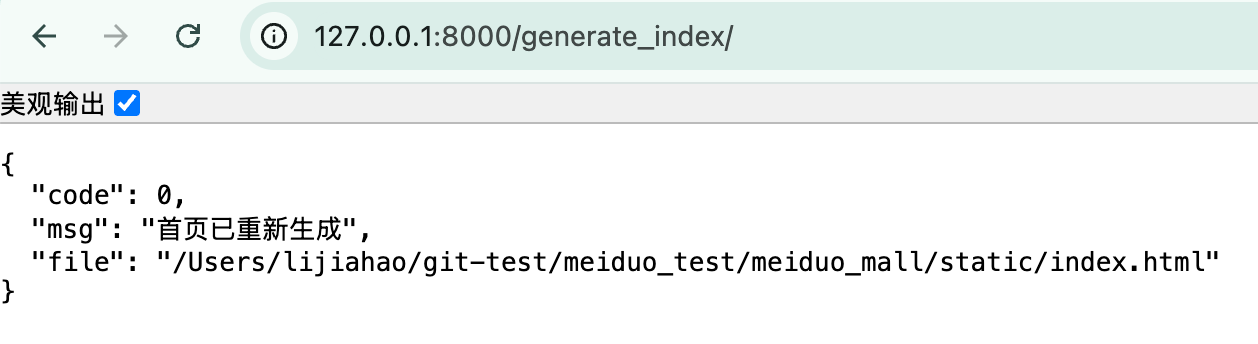

检查meiduo_mall/static/index.html静态确实存在

删除这个页面,进入首页刷新,这个静态文件还会再次生成,证明静态化成功
列表页 / 详情页静态化
一、总体设计
列表页实现思路:
请求 /list/115/1/
        │
        ▼
┌────────────────────────────────
│ 是否存在 static/list/115/1.html │
└─────────────┬──────────────────
              │有
              ▼
        直接返回 HTML(不进 ORM)
              │
              │没有
              ▼
     原 ListView 逻辑(数据库)
              │
              ▼
     顺手生成 static/list/115/1.html
详情页完全同理:
/detail/2/ → static/detail/2.html二、新增文件(核心):apps/goods/utils_static.py
这是整个列表 / 详情页静态化的“母板”
# apps/goods/utils_static.py
import os

from django.conf import settings
from django.test import RequestFactory
from django.template import engines
from django.contrib.auth.models import AnonymousUser

from apps.goods.models import SKU, GoodsCategory
from apps.goods.utils import get_breadcrumb
from apps.contents.utils import get_categories


# ===============================
# 一、列表页:构建上下文
# ===============================
def build_list_context(category_id, page_num, sort="default"):
    from django.core.paginator import Paginator

    try:
        category = GoodsCategory.objects.get(id=category_id)
    except GoodsCategory.DoesNotExist:
        return None

    breadcrumb = get_breadcrumb(category)

    # 排序规则(与你原来一致)
    if sort == "hot":
        order_field = "-sales"
    elif sort == "price":
        order_field = "price"
    else:
        order_field = "create_time"
        sort = "default"

    skus = SKU.objects.filter(
        category_id=category_id,
        is_launched=True
    ).order_by(order_field)

    paginator = Paginator(skus, 5)
    page_skus = paginator.page(page_num)

    return {
        "category": category,
        "categories": get_categories(),
        "breadcrumb": breadcrumb,
        "page_skus": page_skus,
        "sort": sort,
        "page_num": page_num,
        "total_page": paginator.num_pages,
    }


# ===============================
# 二、列表页:生成静态 HTML
# ===============================
def generate_static_list_html(category_id, page_num, sort="default"):
    context = build_list_context(category_id, page_num, sort)
    if not context:
        return None

    jinja_engine = engines["jinja2"]
    template = jinja_engine.get_template("list.html")

    # ⚠️ 必须伪造 request
    request = RequestFactory().get(
        f"/list/{category_id}/{page_num}/?sort={sort}"
    )
    request.user = AnonymousUser()

    html_text = template.render(context, request=request)

    file_path = os.path.join(
        settings.BASE_DIR,
        "static",
        "list",
        str(category_id),
        f"{page_num}.html"
    )

    os.makedirs(os.path.dirname(file_path), exist_ok=True)

    with open(file_path, "w", encoding="utf-8") as f:
        f.write(html_text)

    return file_path


# ===============================
# 三、详情页:构建上下文
# ===============================
def build_detail_context(sku_id):
    try:
        sku = SKU.objects.get(id=sku_id)
    except SKU.DoesNotExist:
        return None

    categories = get_categories()
    breadcrumb = get_breadcrumb(sku.category)
    sku_images = sku.skuimage_set.all()

    # ====== 规格逻辑(完整照搬你原来的) ======
    sku_specs = sku.specs.order_by("spec_id")
    sku_key = [spec.option.id for spec in sku_specs]

    skus = sku.spu.sku_set.all()
    spec_sku_map = {}

    for s in skus:
        s_specs = s.specs.order_by("spec_id")
        key = [spec.option.id for spec in s_specs]
        spec_sku_map[tuple(key)] = s.id

    goods_specs = sku.spu.specs.order_by("id")

    for index, spec in enumerate(goods_specs):
        key = sku_key[:]
        options = spec.options.all()

        for option in options:
            key[index] = option.id
            option.sku_id = spec_sku_map.get(tuple(key))

        spec.spec_options = list(options)

    return {
        "categories": categories,
        "breadcrumb": breadcrumb,
        "sku": sku,
        "specs": goods_specs,
        "sku_images": sku_images,
    }


# ===============================
# 四、详情页:生成静态 HTML
# ===============================
def generate_static_detail_html(sku_id):
    context = build_detail_context(sku_id)
    if not context:
        return None

    jinja_engine = engines["jinja2"]
    template = jinja_engine.get_template("detail.html")

    request = RequestFactory().get(f"/detail/{sku_id}/")
    request.user = AnonymousUser()

    html_text = template.render(context, request=request)

    file_path = os.path.join(
        settings.BASE_DIR,
        "static",
        "detail",
        f"{sku_id}.html"
    )

    os.makedirs(os.path.dirname(file_path), exist_ok=True)

    with open(file_path, "w", encoding="utf-8") as f:
        f.write(html_text)

    return file_path
三、改 apps/goods/views.py
修改 ListView(静态优先)
ListView.get 整体替换为
from django.http import HttpResponse
import os
from django.conf import settings

from apps.goods.utils_static import (
    build_list_context,
    generate_static_list_html,
)


class ListView(View):
    """
    商品列表页(static-first)
    """

    def get(self, request, category_id, page_num):
        sort = request.GET.get("sort", "default")

        static_file = os.path.join(
            settings.BASE_DIR,
            "static",
            "list",
            str(category_id),
            f"{page_num}.html"
        )

        # 1️⃣ 静态文件存在,直接返回
        if os.path.exists(static_file):
            with open(static_file, "r", encoding="utf-8") as f:
                return HttpResponse(f.read(), content_type="text/html; charset=utf-8")

        # 2️⃣ 否则走原动态逻辑
        context = build_list_context(category_id, page_num, sort)
        if not context:
            return render(request, "list.html", {"errmsg": "分类不存在"})

        response = render(request, "list.html", context)

        # 3️⃣ 顺手生成静态文件
        try:
            generate_static_list_html(category_id, page_num, sort)
        except Exception as e:
            print("⚠️ 列表页静态生成失败:", e)

        return response
修改 DetailView(静态优先)
整体替换 DetailView.get
from django.http import HttpResponse
import os
from django.conf import settings

from apps.goods.utils_static import (
    build_detail_context,
    generate_static_detail_html,
)


class DetailView(View):
    """
    商品详情页(static-first)
    """

    def get(self, request, sku_id):

        static_file = os.path.join(
            settings.BASE_DIR,
            "static",
            "detail",
            f"{sku_id}.html"
        )

        # 1️⃣ 静态优先
        if os.path.exists(static_file):
            with open(static_file, "r", encoding="utf-8") as f:
                return HttpResponse(f.read(), content_type="text/html; charset=utf-8")

        # 2️⃣ 动态 fallback
        context = build_detail_context(sku_id)
        if not context:
            return render(request, "404.html")

        response = render(request, "detail.html", context)

        # 3️⃣ 生成静态
        try:
            generate_static_detail_html(sku_id)
        except Exception as e:
            print("⚠️ 详情页静态生成失败:", e)

        return response
最近浏览(Redis)逻辑刻意不进静态流程,真实生产也是:静态页不记录用户行为
测试
手动访问
http://127.0.0.1:8000/list/115/1/
http://127.0.0.1:8000/detail/2/
在项目根目录观察:
ls static/list/115/1.html
ls static/detail/2.html
第二次刷新:
- 不进 ORM
- 不进分页
- 不进规格计算
- 直接
open().read()
Nginx 接管静态页(首页/列表/详情)
现在的前提是
- 静态页已生成到你的 Django 项目目录(比如
meiduo_mall/static/index.html、static/list/<cat>/<page>.html、static/detail/<sku>.html) - 你现在的 Nginx 是 docker-compose.fastdfs.yml 里那个
fastdfs-nginx容器,端口8888:80 - 你希望 Nginx 优先返回静态页,没有静态页再 回源到 Django(
@django)
你最终要实现的访问逻辑
对每个请求:
/→ 先找static/index.html/list/115/1/→ 先找static/list/115/1.html/detail/2/→ 先找static/detail/2.html- 找不到 → 转发给 Django(比如
http://host.docker.internal:8000)
同时:
/static/静态资源(css/js/img)也由 Nginx 出/group1/M00/图片继续走你 FastDFS alias 规则(不动)
1)先确认:静态 HTML 文件放在哪里(宿主机路径)
你项目结构是:
- Django 项目:
/Users/lijiahao/meiduo_mall/ - 静态页生成位置(你当前做法):
/Users/lijiahao/meiduo_mall/static/
你至少要保证这些存在:
ls -l meiduo_mall/static/index.html
ls -l meiduo_mall/static/list/
ls -l meiduo_mall/static/detail/关键点:Nginx 容器必须能挂载到这个目录,否则 try_files 永远命不中。
2)修改 docker-compose.fastdfs.yml:把你的项目 static 目录挂到 Nginx 容器
你现在 nginx service 的 volumes 只有:
./storage/data:/var/fdfs/data:ro- nginx 配置
我们要额外挂载 2 个目录进去:
- 你的 静态 HTML 输出目录:
meiduo_mall/static - (可选但建议)你的 Django 静态资源目录:
meiduo_mall/static_root或static(看你 collectstatic 怎么做)
你目前开发期静态资源就在 meiduo_mall/static,那就直接同一个挂载即可。
修改文件:docker-compose/docker-compose.fastdfs.yml
  nginx:
    image: nginx:1.25-alpine
    container_name: fastdfs-nginx
    ports:
      - "8888:80"
    volumes:
      - ./nginx/nginx.conf:/etc/nginx/nginx.conf:ro
      - ./nginx/conf.d:/etc/nginx/conf.d:ro

      # FastDFS 图片目录(你原来的)
      - ./storage/data:/var/fdfs/data:ro

      # 新增:挂载你宿主机的静态页目录(非常关键)
      - ../static:/var/www/meiduo_static:ro
    depends_on:
      - storage
删除 docker-compose/nginx/conf.d/fastdfs.conf
nginx 的配置统一使用 docker-compose/nginx/conf.d/meiduo.conf
server {
    listen 80;
    server_name localhost;

    # ===============================
    # 静态 HTML 根目录(容器内)
    # ===============================
    set $meiduo_static_root /var/www/meiduo_static;

    # ===============================
    # 首页
    # ===============================
    location = / {
        try_files $meiduo_static_root/index.html @django;
    }

    # ===============================
    # 列表页
    # ===============================
    location ~ ^/list/(\d+)/(\d+)/$ {
        try_files $meiduo_static_root/list/$1/$2.html @django;
    }

    # ===============================
    # 详情页
    # ===============================
    location ~ ^/detail/(\d+)/$ {
        try_files $meiduo_static_root/detail/$1.html @django;
    }

    # ===============================
    # Django static(css/js/images)
    # ===============================
    location /static/ {
        alias /var/www/meiduo_static/;
        expires 7d;
        add_header Cache-Control "public";
        try_files $uri =404;
    }

    # ===============================
    # FastDFS 图片
    # ===============================
    location /group1/M00/ {
        alias /var/fdfs/data/;

        default_type image/jpeg;
        expires 30d;
        add_header Cache-Control "public";
        autoindex off;
    }

    # ===============================
    # Django 回源
    # ===============================
    location @django {
        proxy_set_header Host              $host;
        proxy_set_header X-Real-IP         $remote_addr;
        proxy_set_header X-Forwarded-For   $proxy_add_x_forwarded_for;
        proxy_set_header X-Forwarded-Proto $scheme;

        proxy_pass http://host.docker.internal:8000;
    }
}
重命名 docker-compose.fastdfs.yml 文件
mv docker-compose.fastdfs.yml docker-compose.nginx.yml
修改一下容器名称:
vim docker-compose.nginx.yml
  nginx:
    image: nginx:1.25-alpine
    container_name: meiduo-nginx
    ...
测试
重启nginx,并查看日志
docker compose -f docker-compose.fastdfs.yml up -d --force-recreate nginx
docker logs -f meiduo-nginx
静态文件是否“真的存在”
docker exec -it meiduo-nginx sh
ls /var/www/meiduo_static
浏览器功能测试
一定用 Nginx 端口,不是 8000
首页
http://127.0.0.1:8888/- 页面正常
- 你 Django 终端没有任何请求日志
列表页
http://127.0.0.1:8888/list/115/1/- 页面正常
- Django 没有打印 ListView 的日志
详情页
http://127.0.0.1:8888/detail/2/- 页面正常
- Django 没有打印 DetailView 的日志
刻意访问“没静态的页”
http://127.0.0.1:8888/list/115/999/- 页面还能出来
- Django 此时会有日志
👉 说明:try_files → @django 正常工作
FastDFS 图片测试(别忘了)
打开任意商品图:
http://127.0.0.1:8888/group1/M00/xx/xx.jpg- 图片能直接显示
- Django 没有任何日志
发布者:LJH,转发请注明出处:https://www.ljh.cool/44829.html
